 TarifPing
Help › Alerts
🔔 Alerts
As soon as a change is confirmed, TarifPing lets you know. You choose where, when and from what size of change.
The email alert
Each alert says what changed, by how much, and links to the before/after.
It is sent in your account language (Settings › Language).


When to be alerted
In Settings › Alerts:
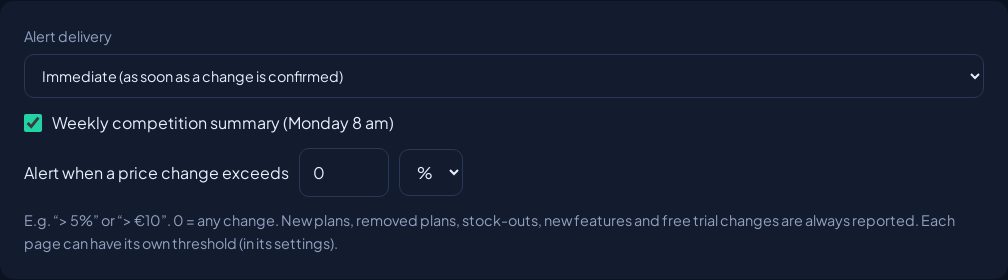
- Alert delivery: immediate (as soon as a change is confirmed) or daily digest (a single email a day, at 6 pm).
- Weekly summary: on Monday at 8 am, what moved at your competitors during the week.
- Threshold: "> 5%" or "> €10" to ignore small changes. 0 = any change.
Always reported, whatever the thresholdNew plan, removed plan, out of stock, new feature and change in free trial length. Each page can also have its own threshold, in its settings.
Slack, Discord and webhook
From the Pro plan, in Settings › Integrations, paste the address given by your tool and click Test: a test message arrives right away.
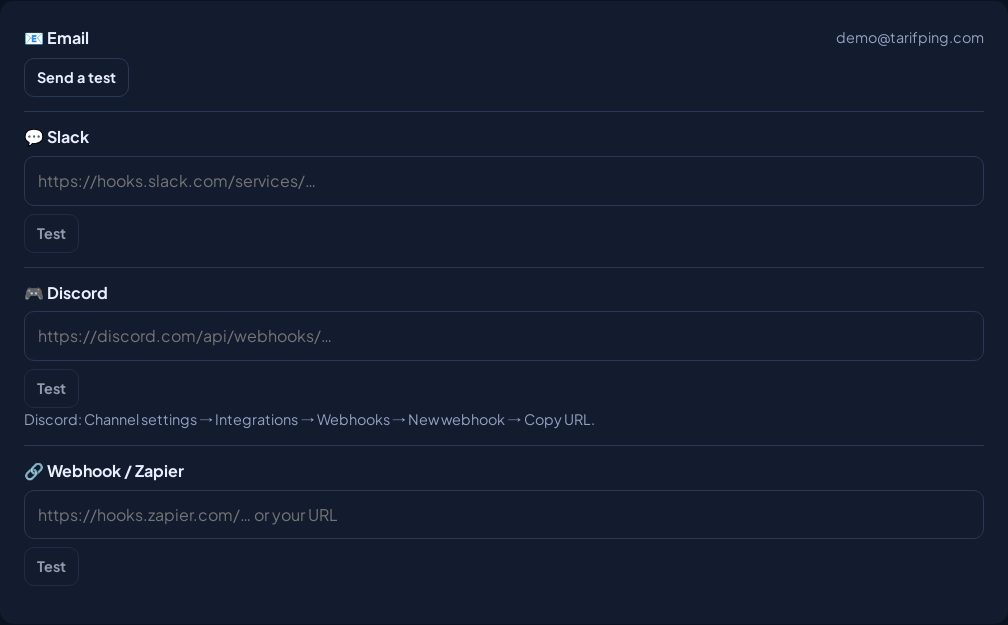
- Slack: create an "Incoming Webhook" for the channel you want and copy its address (
https://hooks.slack.com/services/…). - Discord: Channel settings › Integrations › Webhooks › New webhook › Copy URL.
- Webhook / Zapier / Make: TarifPing sends the change as JSON to the address of your choice.
Don't forget Save at the bottom of the section.